 NextFloorv0.36.0.3
Live features
These features are built in and free. They only need the devices you already have.
Weather at the house#
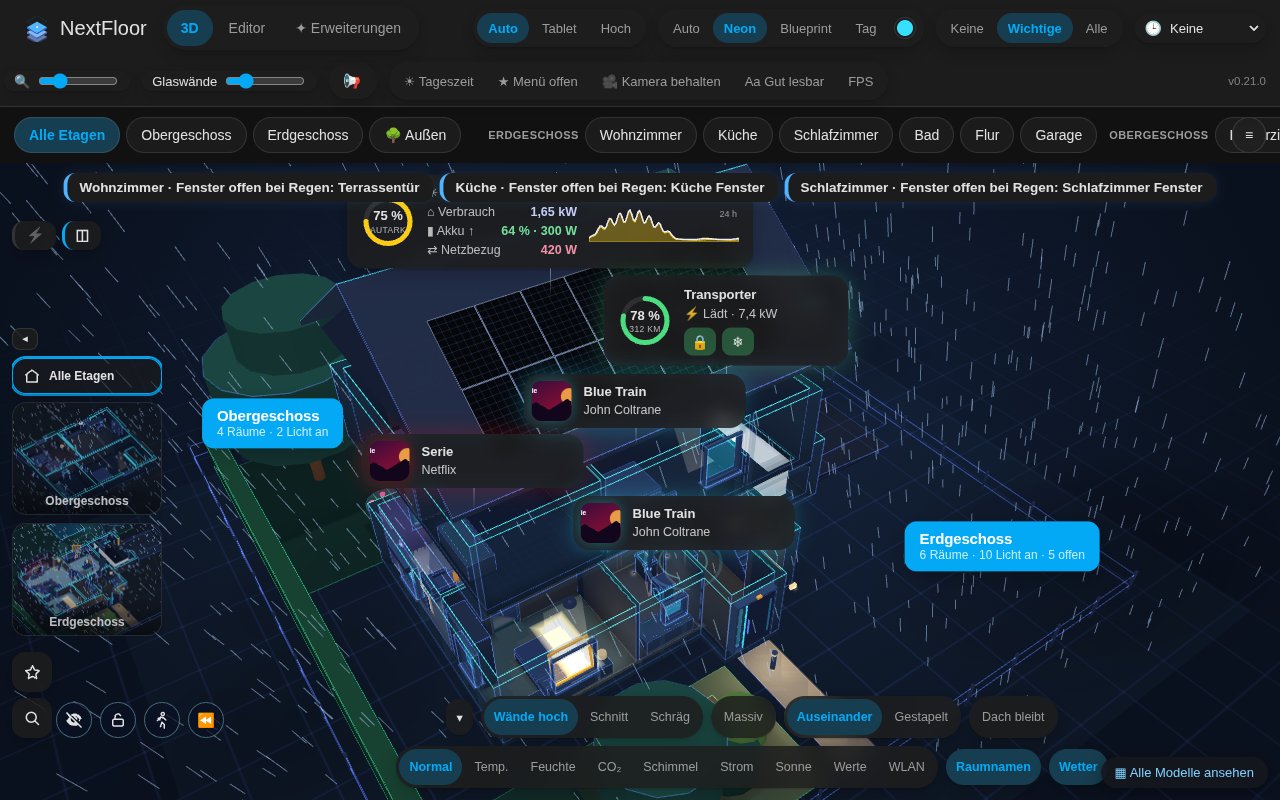
Rain, snow, hail, sleet, fog, clouds with shadows, lightning, sun and moon, driven by a weather entity and the compass. Stars come out on a clear night. Snow lies white on the ground while it snows, and the ground turns wet in the rain.
Sun and shadows#
The house throws its shadow from the real sun (setting Sunlight and shadows, off on Tablet).
With ☀ Time of day switched on in the view options (⚙), the ☀ switch under the 3D view opens a slider over the hours of today. Sun patches, shadow, sky and the Auto look follow the chosen hour; tap again to go back to now.
Sun arc and compass (Settings) draws today's path of the sun as an arc over the property.
Power flow#
Particles run from the solar modules to the inverter, the house, the battery and the grid, along the real cable routes. A glass card shows the balance and your self-sufficiency. More in Climate and energy.
TV screens#
What plays, in the app's colour, plus an ambilight glow behind the TV.
Sound#
A card hovers over every playing speaker or TV with cover and controls. Sound rings in the app's colour grow with the volume. Sound rings (%) on a speaker scales them from 0 (off) to 100 (full size). Multiroom groups are joined by a thread.
Car#
A card over the parking spot shows the charge ring, range, charging power, plug, inside temperature and buttons for lock, climate and charging.
- Away from home, it tells how far the car is.
- It shows the departure time and warns about open doors and hatches.
- Plugged in at a wallbox, it hangs on its cable.
Robot vacuum on the plan#
A robot_vacuum on the plan used to drive lanes that the view invented inside the room it reports. When the robot's integration puts its map on a camera (vacuum_position, charger, path, as NarwalIntegration's map card does), NextFloor shows the truth instead: the robot stands where it says it is, facing where it faces, and the floor keeps the pad it has really driven. The dock is drawn where the robot reports it.
The camera is found by itself: any camera whose attributes carry vacuum_position will do, so nothing has to be chosen. What the view cannot know is how the robot's grid lies on your plan, because the robot counts in its own cells and the plan counts in metres.
Calibrate#
From the rooms (easiest): when the robot's map names its rooms (the Dreame integration does, as rooms), the dock shows the button Calibrate from the rooms. It lays the map's rooms onto the rooms with the same names on the dock's floor. Case, spaces and hyphens do not count. At least two rooms must share a name; from three on, NextFloor also spots a mirrored map by itself. The robot does not have to move.
Fine-tune by hand: if the map sits a little off afterwards, the arrows under the calibration move it by 10 cm, ⟲ ⟳ turn it by 1°, − + change its size by 1 %. Each click is saved at once.
From the robot's position:
- Select the robot's dock in the plan.
- Let the robot drive at least 1.5 m away.
- Press Calibrate from where the robot is now and tap the robot where it stands on the plan.
The dock is the anchor: the plan knows where it stands, and the camera knows where it and the robot lie in the robot's grid. One tap is enough, and everything else (position, heading, track, dock) follows.
Two places cannot tell a mirror from a turn. A map whose y axis runs along plan −z needs the mirrored tick; without it the rooms come out flipped. The calibration is stored as settings.vacuum_map (a/ga and b/gb, plus mirror). A plan without it keeps drawing the lanes the view invents.
- The track is as detailed as the robot's integration sends it. A map card that trims its
pathto a few hundred points gives a coarse track, one that sends more gives a finer one. - Ten minutes after the robot docks, the pad fades out, so the floor does not keep last night's clean. The timeline (⏪) is where a finished clean stays, and it holds the whole day.
- The attribute names are the vacuum map card's, not one brand's: the Xiaomi map extractors (Roborock, Viomi, Roidmi, Dreame, Ijai), the Roborock integration and NarwalIntegration all publish them. A unit that reports in millimetres rather than map cells works just as well, because the two places set the scale.
- The integration has to expose them as attributes. Some do so only when asked: the map extractors want
vacuum_positionandpathin theirattributes:list.
Everything off#
⏻ Everything off in the room panel, or ⏻ in the bar on top for the open floor, switches off lights, switches, fans and media. ↶ Undo brings it all back for ten seconds.